
ರೆಫರೆನ್ಸ್
Card Designer ನ Build Your Journey ಹಂತದಲ್ಲಿ ನೀವು ಮೂರು ಬಹುಮಾನ ಪ್ರಕಾರಗಳಲ್ಲಿ ಒಂದನ್ನು ಆರಿಸುತ್ತೀರಿ. ಪ್ರತಿ ಪ್ರಕಾರವೂ ವಿಭಿನ್ನ ಸಂವಹನ ಸನ್ನಿವೇಶ, ವಿಭಿನ್ನ ಆರ್ಥಿಕತೆ ಮತ್ತು ವಿಭಿನ್ನ ಮಟ್ಟದ ನಿಯಂತ್ರಣ.
6. Rewards — ಮೂರು ಬಗೆಯ ಉಡುಗೊರೆಗಳು
Card Designer ನ Build Your Journey ಹಂತದಲ್ಲಿ ನೀವು ಮೂರು ಬಹುಮಾನ ಪ್ರಕಾರಗಳಲ್ಲಿ ಒಂದನ್ನು ಆರಿಸುತ್ತೀರಿ. ಪ್ರತಿ ಪ್ರಕಾರವೂ ವಿಭಿನ್ನ ಸಂವಹನ ಸನ್ನಿವೇಶ, ವಿಭಿನ್ನ ಆರ್ಥಿಕತೆ ಮತ್ತು ವಿಭಿನ್ನ ಮಟ್ಟದ ನಿಯಂತ್ರಣ.
6.1 Award — ತಕ್ಷಣದ ಪಠ್ಯ ಉಡುಗೊರೆ
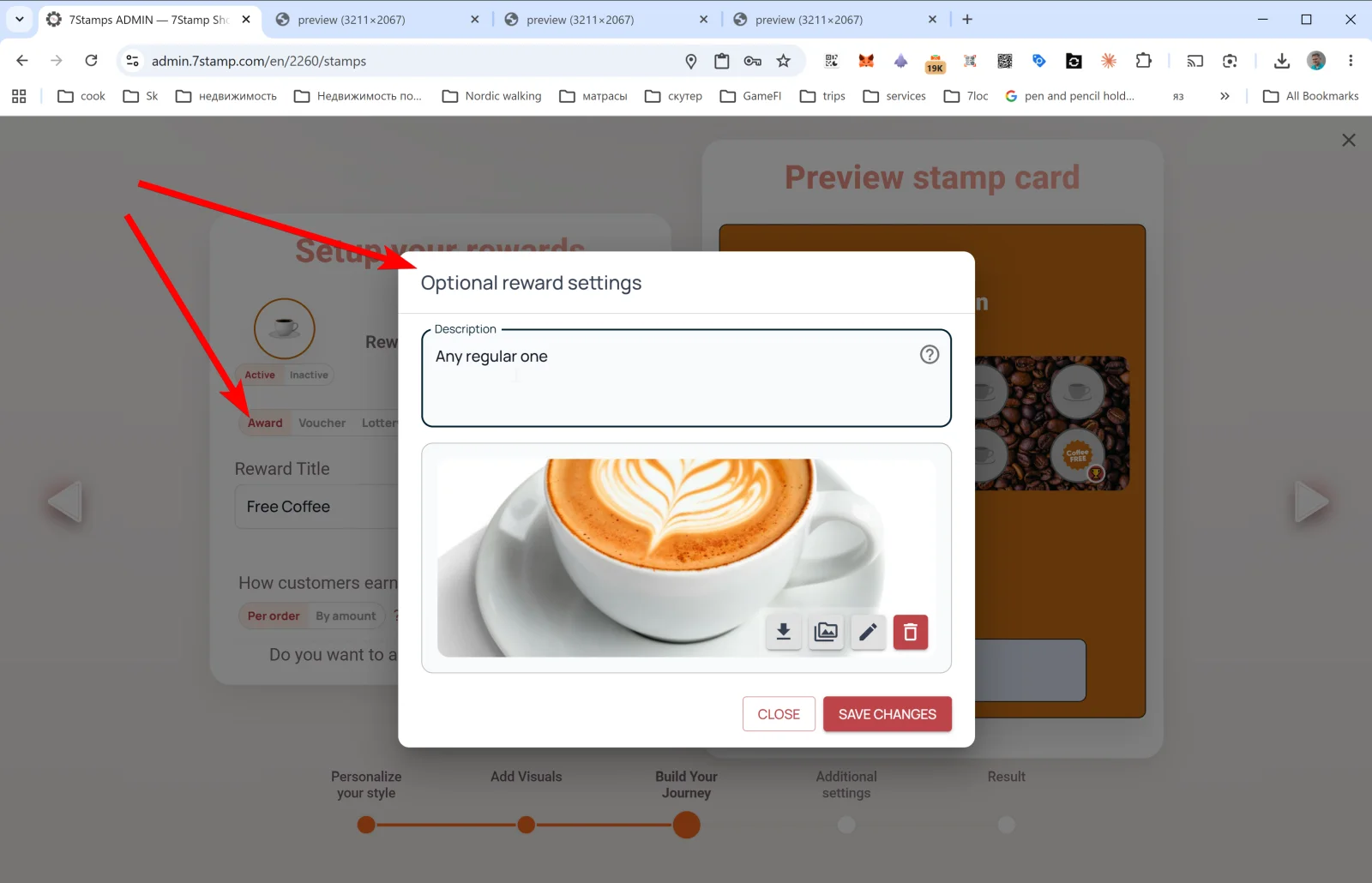
Award ಅತ್ಯಂತ ಸರಳ ಪ್ರಕಾರ. ಗುರಿ ತಲುಪಿದಾಗ ಗ್ರಾಹಕರು ನೋಡುವ ಒಂದು ಪಠ್ಯ ಸಂದೇಶ ಮತ್ತು ಚಿತ್ರ ಮಾತ್ರ. ಕೋಡ್ಗಳಿಲ್ಲ, ವೋಚರ್ಗಳಿಲ್ಲ, ಡ್ರಾಗಳಿಲ್ಲ — ಗ್ರಾಹಕರು ಪರದೆಯನ್ನು ಕ್ಯಾಷಿಯರ್ಗೆ ತೋರಿಸುತ್ತಾರೆ, ಕ್ಯಾಷಿಯರ್ ಉಡುಗೊರೆ ನೀಡುತ್ತಾರೆ.
Award ಗಾಗಿ ಐಚ್ಛಿಕ ಬಹುಮಾನ ಸೆಟ್ಟಿಂಗ್ಗಳು
- Description — ಉಡುಗೊರೆಯ ವಿವರಣೆ (ಉದಾ.,
Any regular coffee from our menu). - Image — ಉಡುಗೊರೆಯ ಚಿತ್ರ (PNG, JPG, JPEG, WEBP, SVG, HEIC, HEIF, AVIF). ಕ್ಲಿಪ್ಬೋರ್ಡ್ನಿಂದ ಅಂಟಿಸಬಹುದು.
- ಬಟನ್ಗಳು: CLOSE / SAVE CHANGES.
Award ಅನ್ನು ಯಾವಾಗ ಬಳಸಬೇಕು
- ನಿಮ್ಮ ಸೇವೆ ತ್ವರಿತ ನಂಬಿಕೆಯ ಮೇಲೆ ನಡೆಯುವಾಗ (ಕಾಫಿ ಅಂಗಡಿ, ಬೇಕರಿ, ಫಾಸ್ಟ್ ಫುಡ್).
- ನಿಮ್ಮ POS ಪ್ರೋಮೋ ಕೋಡ್ಗಳನ್ನು ಬೆಂಬಲಿಸದಿದ್ದಾಗ.
- ಗ್ರಾಹಕರಿಗೆ ಸೇವೆ ನೀಡುವ ಅದೇ ಸಿಬ್ಬಂದಿ ಉಡುಗೊರೆ ನೀಡುವಾಗ.
- ನೀವು ಕಾರ್ಯಕ್ರಮವನ್ನು ಪರೀಕ್ಷಿಸುತ್ತಿದ್ದು ಎಲ್ಲವನ್ನೂ ಸರಳವಾಗಿಡಲು ಬಯಸುವಾಗ.
Award ಅನ್ನು ಯಾವಾಗ ಬಳಸಬಾರದು
- ಗ್ರಾಹಕರು ಸ್ಕ್ರೀನ್ಶಾಟ್ ತೆಗೆದು ಮತ್ತೆ ಬಳಸಲು ಪ್ರಯತ್ನಿಸುವ ಅಪಾಯವಿದ್ದಾಗ. ಬದಲಿಗೆ ವೋಚರ್ ಬಳಸಿ — ಅದಕ್ಕೆ
redeemedಜೀವನಚಕ್ರ ಸ್ಥಿತಿ ಇದೆ, ಅದರ ನಂತರ ವೋಚರ್ ಅಮಾನ್ಯವಾಗುತ್ತದೆ. - ಉಡುಗೊರೆ ದುಬಾರಿಯಾಗಿದ್ದು ಅದು ಯಾವಾಗ ರಿಡೀಮ್ ಆಗುತ್ತದೆ ಎಂದು ನಿಯಂತ್ರಿಸಲು ಬಯಸಿದಾಗ. ಇಲ್ಲಿಯೂ ವೋಚರ್ ಹೆಚ್ಚು ಸುರಕ್ಷಿತ.
6.2 ವೋಚರ್ — Redeem Code ಇರುವ Smart Voucher
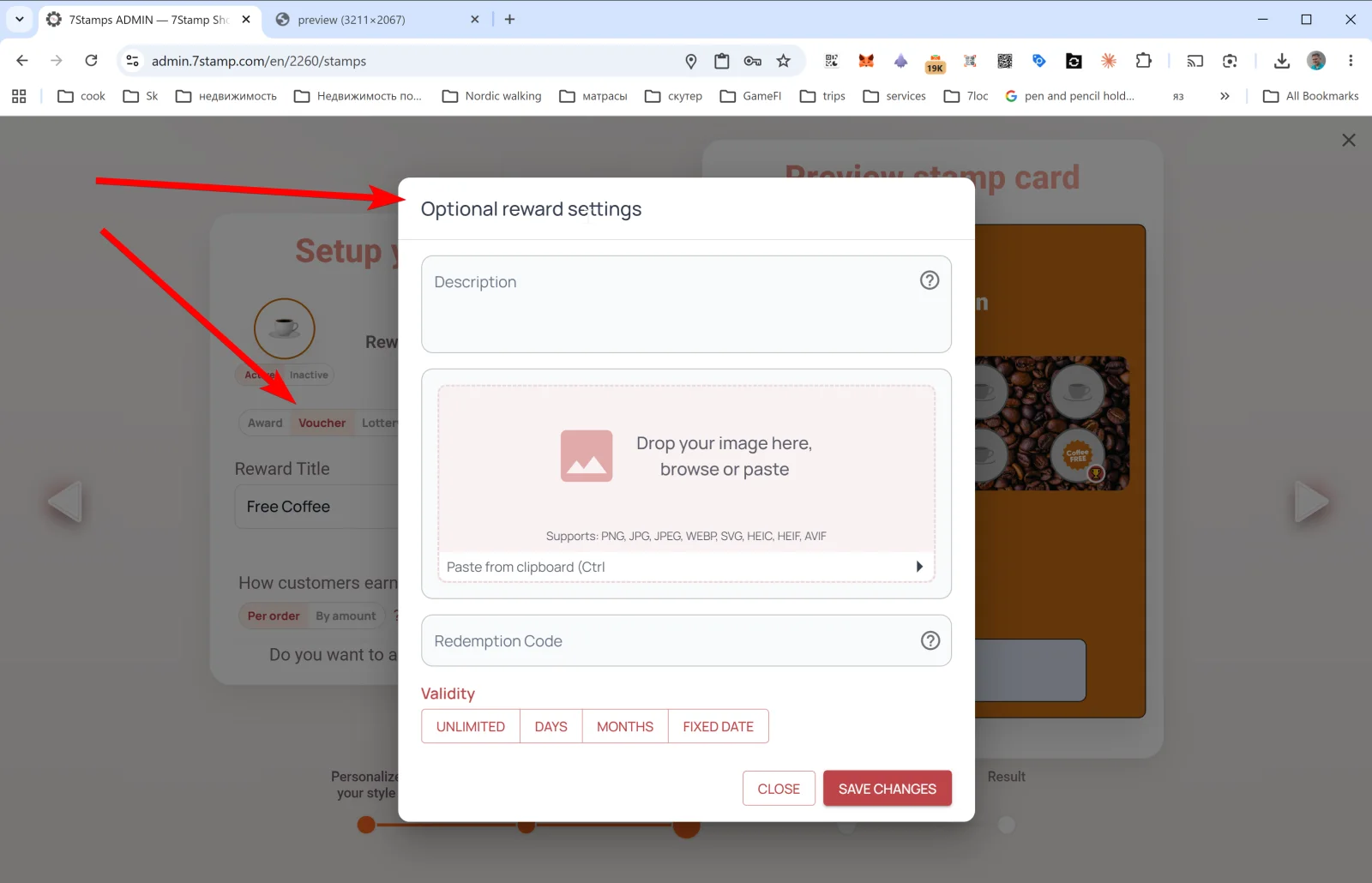
ವೋಚರ್ (Smart Voucher) ತನ್ನದೇ ಜೀವನಚಕ್ರವಿರುವ ವೋಚರ್. ಗುರಿ ತಲುಪಿದ ನಂತರ ಗ್ರಾಹಕರ Wallet ನಲ್ಲಿ active ವೋಚರ್ ಕಾಣಿಸುತ್ತದೆ. ಗ್ರಾಹಕರು ಅದನ್ನು ಬೇಕಾದಾಗ ಬಳಸುತ್ತಾರೆ — ಅದನ್ನು ಗಳಿಸಿದ ಕ್ಷಣದಿಂದ ಪ್ರತ್ಯೇಕವಾಗಿ. ಕ್ಯಾಷಿಯರ್ ವೋಚರ್ ರಿಡೀಮ್ ಮಾಡಿದಾಗ ಸ್ಥಿತಿ redeemed ಗೆ ಬದಲಾಗುತ್ತದೆ ಮತ್ತು ಅದನ್ನು ಮತ್ತೆ ಬಳಸಲಾಗುವುದಿಲ್ಲ — ಗ್ರಾಹಕರು ಸ್ಕ್ರೀನ್ಶಾಟ್ ಇಟ್ಟುಕೊಂಡಿದ್ದರೂ ಸಹ.
ವೋಚರ್ಗಾಗಿ ಐಚ್ಛಿಕ ಬಹುಮಾನ ಸೆಟ್ಟಿಂಗ್ಗಳು
- Description — ವೋಚರ್ನ ವಿವರಣೆ.
- Image — ಚಿತ್ರ (PNG / JPG / JPEG / WEBP / SVG / HEIC / HEIF / AVIF).
- Redeem Code — ರಿಡೀಮ್ ಕೋಡ್. ಇದು ನಿಮ್ಮ POS ನಲ್ಲಿನ ಸಾಮಾನ್ಯ ಪ್ರೋಮೋ ಕೋಡ್ಗೆ ಹೊಂದಬಹುದು (ಉದಾ.,
FREECOFFEE,GIFT100,BDAY25). ಕೋಡ್ ಸ್ವಯಂಚಾಲಿತವಾಗಿ ಪಠ್ಯವಾಗಿ ಮತ್ತು QR ಆಗಿ ತೋರಿಸಲ್ಪಡುತ್ತದೆ. ನಿಮ್ಮ POS ಈಗಾಗಲೇ ಪ್ರೋಮೋ ಕೋಡ್ಗಳನ್ನು ನಿರ್ವಹಿಸುತ್ತಿದ್ದರೆ — ಯಾವುದೇ ಏಕೀಕರಣ ಬೇಕಿಲ್ಲ; ಕ್ಯಾಷಿಯರ್ ಕೋಡ್ ಓದುತ್ತಾರೆ ಅಥವಾ ಕ್ಯಾಶ್ ವ್ಯವಸ್ಥೆಯಲ್ಲಿ ನಮೂದಿಸುತ್ತಾರೆ. - Validity — ಅವಧಿ. ನಾಲ್ಕು ಆಯ್ಕೆಗಳಲ್ಲಿ ಒಂದು:
- UNLIMITED — ಅವಧಿ ಮುಗಿಯುವುದಿಲ್ಲ.
- DAYS — ನೀಡಿದ ದಿನದಿಂದ N ದಿನಗಳು.
- MONTHS — ನೀಡಿದ ದಿನದಿಂದ N ತಿಂಗಳುಗಳು.
- FIXED DATE — ನಿರ್ದಿಷ್ಟ ದಿನಾಂಕದವರೆಗೆ.
ವೋಚರ್ನ ಜೀವನಚಕ್ರ
issued → active → redeemed → expired
- issued — ವೋಚರ್ ರಚನೆಯಾಗಿದೆ ಆದರೆ ಇನ್ನೂ ಗ್ರಾಹಕರಿಗೆ ಜೋಡಿಸಿಲ್ಲ (ಸ್ವತಂತ್ರ ವೋಚರ್ಗಳಿಗೆ).
- active — ವೋಚರ್ ಗ್ರಾಹಕರ Wallet ನಲ್ಲಿ ಲಭ್ಯ; ಬಳಸಬಹುದು.
- redeemed — ವೋಚರ್ ಬಳಕೆಯಾಗಿದೆ; ಮತ್ತೆ ಬಳಸಲಾಗುವುದಿಲ್ಲ.
- expired — ಮಾನ್ಯತೆಯ ಅವಧಿ ಮುಗಿದಿದೆ.
ಈ ಸ್ಥಿತಿ ಯಂತ್ರವೇ ಸ್ಕ್ರೀನ್ಶಾಟ್ ವಂಚನೆಯ ವಿರುದ್ಧ ಮುಖ್ಯ ರಕ್ಷಣೆ. ಗ್ರಾಹಕರು ಸ್ಕ್ರೀನ್ಶಾಟ್ ಇಟ್ಟುಕೊಂಡಿದ್ದರೂ, redeemed ನಂತರ ಕ್ಯಾಶ್ ವ್ಯವಸ್ಥೆ (Redeem Code ಮೂಲಕ) ಅಥವಾ ಸ್ಕ್ಯಾನರ್ ಅದನ್ನು ಮತ್ತೆ ಅನ್ವಯಿಸಲು ನಿರಾಕರಿಸುತ್ತದೆ.
ವೋಚರ್ ಅನ್ನು ಯಾವಾಗ ಬಳಸಬೇಕು
- ಉಡುಗೊರೆ ದುಬಾರಿಯಾಗಿದ್ದು ಹಸ್ತಾಂತರವನ್ನು ದೃಢೀಕರಿಸಬೇಕಾದಾಗ.
- ಸನ್ನಿವೇಶ “ಈಗ ಗಳಿಸಿ, ನಂತರ ಬಳಸಿ” ಆಗಿದ್ದಾಗ (ಸಲೂನ್ಗಳು, ರೆಸ್ಟೋರೆಂಟ್ಗಳು, ಪ್ರೀಮಿಯಂ ಸೇವೆಗೆ ಸಾಮಾನ್ಯ).
- ನಿಮ್ಮ POS ಈಗಾಗಲೇ ಪ್ರೋಮೋ ಕೋಡ್ಗಳನ್ನು ಬೆಂಬಲಿಸಿದಾಗ — Redeem Code ಇರುವ ವೋಚರ್ ಯಾವುದೇ POS ಬದಲಾವಣೆ ಇಲ್ಲದೆ 7Stamp ಅನ್ನು ನಿಮ್ಮ ಈಗಿನ ರಿಯಾಯಿತಿ ವ್ಯವಸ್ಥೆಯ ಮೇಲಿನ Wallet ಪದರವನ್ನಾಗಿ ಮಾಡುತ್ತದೆ.
- ನಿಖರವಾದ Redemption rate ಸೂಚಕ ಬೇಕಾದಾಗ — ಎಷ್ಟು ವೋಚರ್ಗಳು ನಿಜವಾಗಿ ಬಳಕೆಯಾದವು.
6.3 Lottery — ಆಟದ ರೂಪದ ಡ್ರಾ
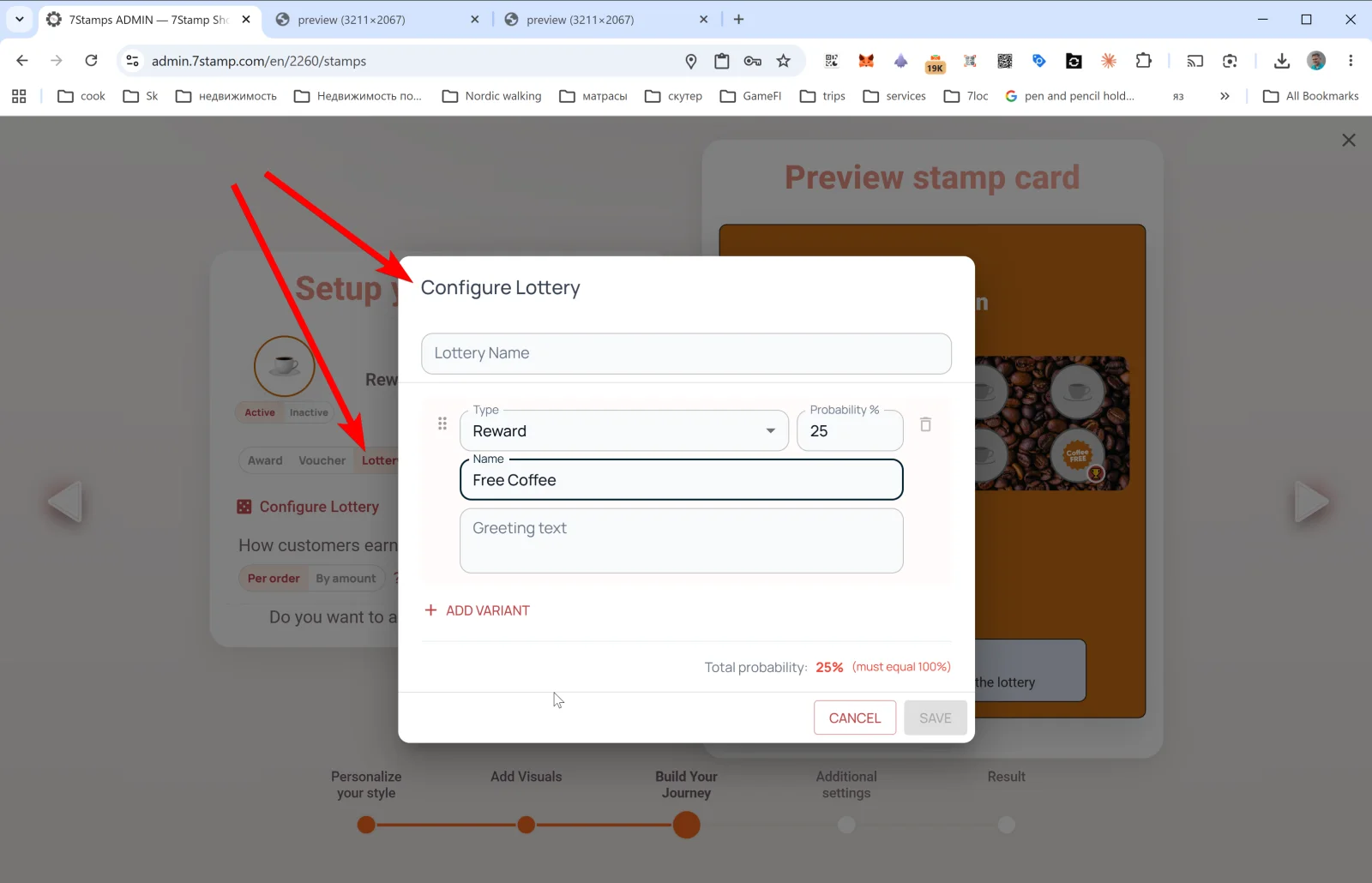
Lottery ಆಟದ ರೂಪದ ಬಹುಮಾನ. ಒಂದೇ ಉಡುಗೊರೆಯ ಬದಲು ನೀವು ರೂಪಾಂತರಗಳ ಪೂಲ್ (ಡ್ರಾ ಆಯ್ಕೆಗಳು) ರಚಿಸುತ್ತೀರಿ, ಮತ್ತು ಗುರಿ ತಲುಪಿದಾಗ ಗ್ರಾಹಕರು ಲಾಟರಿ ತಿರುಗಿಸುತ್ತಾರೆ. ಪೂಲ್ಗೆ ಪ್ರತಿ ಪ್ರಕಾರದ ಎಷ್ಟು ಸ್ಲಾಟ್ಗಳು ಹೋಗಬೇಕು ಎಂದು ವ್ಯಾಪಾರ ನಿರ್ಧರಿಸುತ್ತದೆ — ಎಲ್ಲ ಸ್ಲಾಟ್ಗಳ ಒಟ್ಟು ಸಂಭವನೀಯತೆ 100% ಆಗಿರಬೇಕು.
ಲಾಟರಿ ಪೂಲ್ನಲ್ಲಿ ನಾಲ್ಕು ಸ್ಲಾಟ್ ಪ್ರಕಾರಗಳು
7Stamp ವಾಸ್ತುಶಿಲ್ಪದ ಪ್ರಕಾರ, ಲಾಟರಿ ಸ್ಲಾಟ್ ನಾಲ್ಕು ಪ್ರಕಾರಗಳಲ್ಲಿ ಒಂದಾಗಿರಬಹುದು:
- Award slot — ತಕ್ಷಣದ ಪಠ್ಯ ಉಡುಗೊರೆ (ಸಾಮಾನ್ಯ Award ನಂತೆಯೇ).
- Voucher slot — ವೋಚರ್ (ತನ್ನದೇ ಜೀವನಚಕ್ರವಿರುವ Smart Voucher, ಬೇಕಿದ್ದರೆ Redeem Code ನೊಂದಿಗೆ).
- “Try again” — ಮರು ತಿರುಗಿಸುವಿಕೆ. ಗ್ರಾಹಕರು ತಕ್ಷಣ ಮತ್ತೆ ಲಾಟರಿ ತಿರುಗಿಸುತ್ತಾರೆ.
- “No prize” — ಖಾಲಿ ಸ್ಲಾಟ್. ಆರ್ಥಿಕತೆಯನ್ನು ಸಮತೋಲನಗೊಳಿಸಲು ಮತ್ತು ಗುರಿ ತಲುಪುವ ಪ್ರತಿಯೊಬ್ಬರಿಗೂ ದುಬಾರಿ ವೋಚರ್ಗಳನ್ನು ನೀಡದಿರಲು ಬಳಸಲಾಗುತ್ತದೆ.
ಗ್ರಾಹಕರು “ಬಹುಮಾನ” ಗೆದ್ದರೆ, ಅವರಿಗೆ Award ಅಥವಾ ವೋಚರ್ ಸಿಗುತ್ತದೆ — ಪರದೆ ಅದಕ್ಕೆ ತಕ್ಕಂತೆ ವರ್ತಿಸುತ್ತದೆ (ಪಠ್ಯ ಉಡುಗೊರೆ ಅಥವಾ Voucher Unlocked!).
Configure Lottery — ಪೂಲ್ ಸೆಟಪ್
- Lottery Name — ಲಾಟರಿಯ ಹೆಸರು.
- ಪ್ರತಿ ರೂಪಾಂತರಕ್ಕೆ:
- Type — ಸ್ಲಾಟ್ ಪ್ರಕಾರ: Award, Voucher, Try again ಅಥವಾ No prize.
- Probability % — ಸಿಗುವ ಸಾಧ್ಯತೆ (ಉದಾ., 25).
- Name — ಸ್ಲಾಟ್ ಹೆಸರು (ಉದಾ.,
Free Coffee,Try again,Maybe next time). - Greeting text — ಈ ಸ್ಲಾಟ್ ಸಿಕ್ಕಾಗ ಗ್ರಾಹಕರು ನೋಡುವ ಪಠ್ಯ.
- + ADD VARIANT — ಇನ್ನೊಂದು ಸ್ಲಾಟ್ ಸೇರಿಸಿ.
- Total probability: NN% — ಸೂಚಕ: ಎಲ್ಲ ಸ್ಲಾಟ್ಗಳ ಸಂಭವನೀಯತೆಗಳ ಮೊತ್ತ 100% ಆಗಿರಬೇಕು. ಇಲ್ಲದಿದ್ದರೆ SAVE ನಿಷ್ಕ್ರಿಯವಾಗಿರುತ್ತದೆ.
ಲಾಟರಿ ಎಲ್ಲಿ ನಡೆಯುತ್ತದೆ
ನೀವು ಬಳಸುವ ಸೇವಾ ಕಾರ್ಯಪ್ರವಾಹವನ್ನು ಅವಲಂಬಿಸಿ:
- Staff Scanner (Manual) — ತಿರುಗಿಸುವಿಕೆ ಸಿಬ್ಬಂದಿಯ ಫೋನ್ನಲ್ಲಿ ತೆರೆಯುತ್ತದೆ; ಅವರು ಪರದೆಯನ್ನು ಗ್ರಾಹಕರಿಗೆ ತೋರಿಸಿ “Play” ಒತ್ತಲು ಆಹ್ವಾನಿಸುತ್ತಾರೆ.
- Self-Service Kiosk — ಗ್ರಾಹಕರೇ ಕ್ಯಾಶ್ ಕೌಂಟರ್ ಬಳಿಯ ಟ್ಯಾಬ್ಲೆಟ್ನಲ್ಲಿ ತಿರುಗಿಸುತ್ತಾರೆ.
- Receipt QR / Delivery QR — ಗ್ರಾಹಕರು ರಸೀದಿ ಅಥವಾ ಇನ್ಸರ್ಟ್ನ QR ಸ್ಕ್ಯಾನ್ ಮಾಡಿ ತಮ್ಮ ಫೋನ್ನ ಬ್ರೌಸರ್ನಲ್ಲೇ ತಿರುಗಿಸುತ್ತಾರೆ, ಆ್ಯಪ್ ಬೇಕಿಲ್ಲ.
Lottery ಅನ್ನು ಯಾವಾಗ ಬಳಸಬೇಕು
- ಭಾವನಾತ್ಮಕ ಕ್ಷಣವನ್ನು ಹೆಚ್ಚಿಸಲು ಬಯಸಿದಾಗ — ಲಾಟರಿ ಆಟದ ಅನುಭವ ಸೇರಿಸುತ್ತದೆ, ಮತ್ತು ಗ್ರಾಹಕರು ಅದನ್ನು ಸಾಮಾನ್ಯ ಉಡುಗೊರೆಗಿಂತ ಹೆಚ್ಚು ನೆನಪಿಟ್ಟುಕೊಳ್ಳುತ್ತಾರೆ.
- ಆರ್ಥಿಕತೆಯನ್ನು ಸಮತೋಲನಗೊಳಿಸಬೇಕಾದಾಗ: “Try again” ಮತ್ತು “No prize” ಸ್ಲಾಟ್ಗಳನ್ನು ಸೇರಿಸಿ, ಇದರಿಂದ ಗುರಿ ತಲುಪುವ ಪ್ರತಿಯೊಬ್ಬರಿಗೂ ದುಬಾರಿ ವೋಚರ್ ಸಿಗುವುದಿಲ್ಲ.
- ಒಂದು ಬಾರಿಯ ಮಾರ್ಕೆಟಿಂಗ್ ಅಭಿಯಾನಗಳಿಗೆ (ಉದಾ., ಬ್ರ್ಯಾಂಡ್ ವಾರ್ಷಿಕೋತ್ಸವ).
ಯಾವುದನ್ನು ತಪ್ಪಿಸಬೇಕು
- ಒಂದೇ 100% ಸ್ಲಾಟ್ ಇರುವ ಲಾಟರಿ ಮಾಡಬೇಡಿ — ಅದು ಹೆಚ್ಚುವರಿ ಕ್ಲಿಕ್ನಲ್ಲಿ ಸುತ್ತಿದ Award/ವೋಚರ್ ಮಾತ್ರ.
- “No prize” ಅನ್ನು ಪ್ರಬಲವಾಗಿಸಬೇಡಿ (>50%) — ಗ್ರಾಹಕರು ಮೋಸ ಹೋದಂತೆ ಭಾವಿಸಿ ಕಾರ್ಯಕ್ರಮ ಬಿಡುತ್ತಾರೆ.
- ಜೂಜನ್ನು ನಿಯಂತ್ರಿಸುವ ನ್ಯಾಯವ್ಯಾಪ್ತಿಗಳಲ್ಲಿ, ನೈಜ ಬಹುಮಾನಗಳಿರುವ ಲಾಟರಿಗೆ ಕಾನೂನು ಪರಿಶೀಲನೆ ಬೇಕಾಗಬಹುದು ಎಂಬುದನ್ನು ನೆನಪಿಡಿ.
6.4 Milestone Rewards — ಒಂದೇ ಕಾರ್ಡ್ನಲ್ಲಿ ಹಲವು ಗುರಿಗಳು
Card Designer ಹಂತ 3 ರಲ್ಲಿ, ಸಾಮಾನ್ಯ ಬಹುಮಾನ ವಿಭಾಗದ ಕೆಳಗೆ ಒಂದು ಲಿಂಕ್ ಇದೆ: Do you want to add milestone rewards? Yes! ಅದನ್ನು ಒತ್ತಿದರೆ ಕಾರ್ಡ್ನ ಹಾದಿಯಲ್ಲಿ ಮಧ್ಯಂತರ ಉಡುಗೊರೆಗಳು ಸೇರುತ್ತವೆ.
9 ಸ್ಟ್ಯಾಂಪ್ಗಳು ಮತ್ತು ಎರಡು ಮೈಲಿಗಲ್ಲುಗಳಿರುವ ಉದಾಹರಣೆ ಕಾರ್ಡ್:
- 3 ಸ್ಟ್ಯಾಂಪ್ಗಳು → Award: “ನಿಮ್ಮ ಮುಂದಿನ ಆರ್ಡರ್ ಮೇಲೆ 10% ರಿಯಾಯಿತಿ”.
- 6 ಸ್ಟ್ಯಾಂಪ್ಗಳು → Voucher: Redeem Code
DESSERT6ಇರುವ “ಉಚಿತ ಡೆಸರ್ಟ್”. - 9 ಸ್ಟ್ಯಾಂಪ್ಗಳು → Voucher (ಅಂತಿಮ): Redeem Code
FREEPIZZA9ಇರುವ “ಉಚಿತ ಪಿಜ್ಜಾ”.
Milestone Rewards ಅನ್ನು ಯಾವಾಗ ಬಳಸಬೇಕು
- ಅಂತಿಮ ಗುರಿ ದೂರದಲ್ಲಿದ್ದು (8+ ಸ್ಟ್ಯಾಂಪ್ಗಳು) ಗ್ರಾಹಕರು ದಾರಿಯಲ್ಲಿ ಪ್ರೇರಣೆ ಕಳೆದುಕೊಳ್ಳಬಹುದಾದಾಗ.
- ಗ್ರಾಹಕರನ್ನು ಬೇಗನೆ ಮರಳಿ ಕರೆತರಲು ಬಯಸಿದಾಗ — 3ನೇ ಸ್ಟ್ಯಾಂಪ್ನಲ್ಲಿ ಒಂದು ಚಿಕ್ಕ ಬಹುಮಾನ ಹೆಚ್ಚು ಆಗಾಗ್ಗೆ ಭೇಟಿಗಳಿಗೆ ಪ್ರೇರೇಪಿಸುತ್ತದೆ.
- ಬಹುತೇಕ ಎಲ್ಲರಿಗೂ ಚಿಕ್ಕ ಬೋನಸ್ ಮತ್ತು ಅತ್ಯಂತ ನಿಷ್ಠಾವಂತರಿಗೆ ದೊಡ್ಡ ಬೋನಸ್ ನೀಡುವುದು ನಿಮ್ಮ ಆರ್ಥಿಕತೆಗೆ ಅರ್ಥಪೂರ್ಣವಾದಾಗ.
ಗ್ರಾಹಕರು ಏನು ನೋಡುತ್ತಾರೆ
Wallet ನಲ್ಲಿ ಗ್ರಾಹಕರು ಮುಂದಿನ ಮೈಲಿಗಲ್ಲಿನ ಸೂಚನೆಗಳಿರುವ ಪ್ರಗತಿ ಪಟ್ಟಿಯನ್ನು ನೋಡುತ್ತಾರೆ. ಪ್ರತಿ ಮಧ್ಯಂತರ ಉಡುಗೊರೆಯೂ Wallet push notification ಅನ್ನು ಕಳುಹಿಸುತ್ತದೆ ಮತ್ತು ಹೊಂದುವ Award/ವೋಚರ್ ಅನ್ನು ಸೇರಿಸುತ್ತದೆ.
Visual walkthrough
Use the screen sets below as a visual companion to the article. Open any image to inspect it at full size.